
Booking Page Section Links: Send clients to the right place
Instagram is where clients find your work. Your booking page is where they actually book it.
When we launched BookPay we provided you with a personalized link for your booking page, which you could paste to your Instagram bio, your TikTok, your email signature, wherever people first hear about you.
inkjin.com/@username or bookpay.inkjin.com/@username
(both domains work the same and you can use whatever is easier for you)
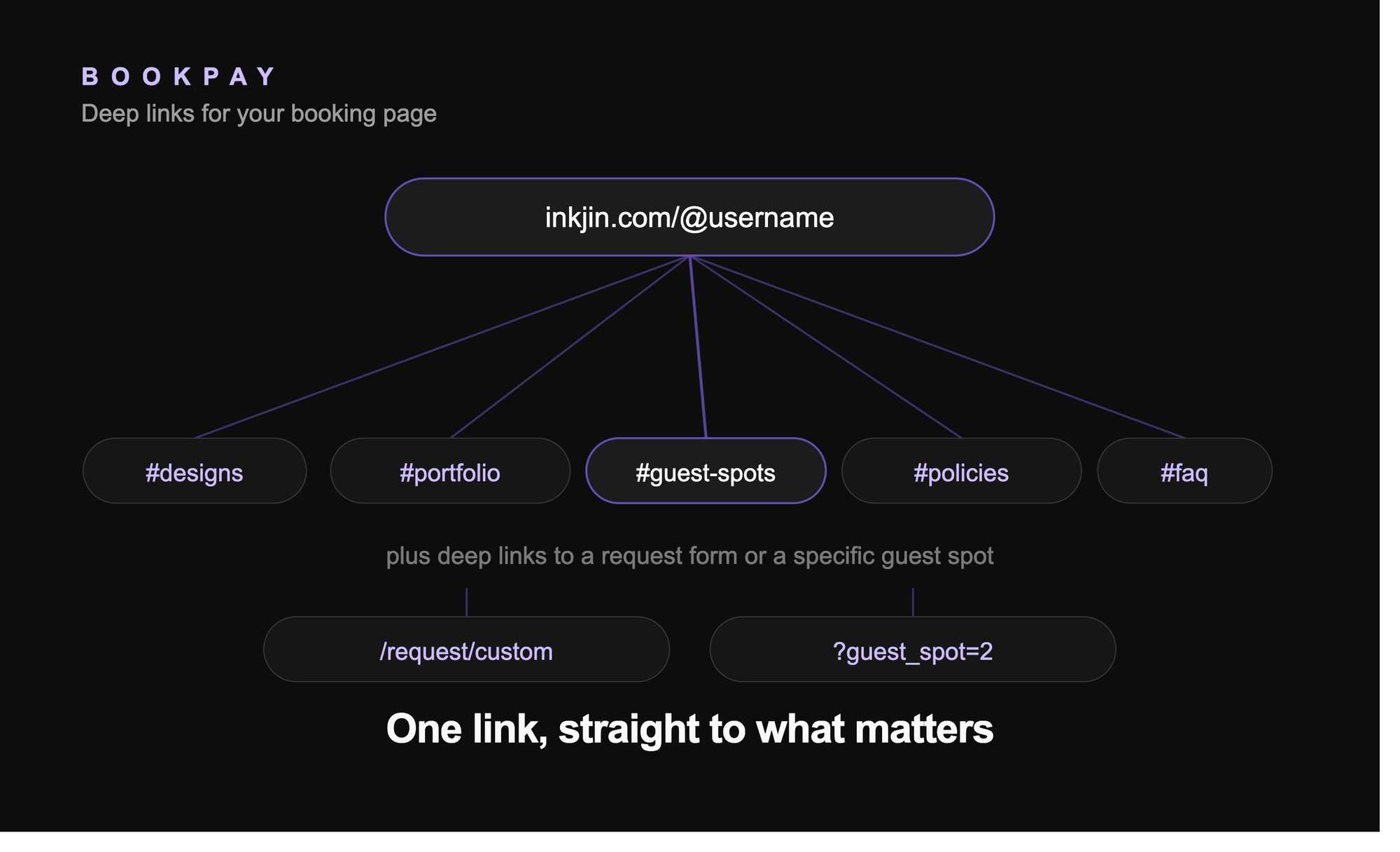
Now we added more links that let you connect different sections of your page. These links will open directly on that section, so you can send a client to a specific part of your page (eg. Guest Spot or Policies sections).
Here are the available section links:
- Available designs:
inkjin.com/@username#designs - Portfolio:
inkjin.com/@username#portfolio - Guest spots:
inkjin.com/@username#guest-spots - Policies:
inkjin.com/@username#policies - FAQ:
inkjin.com/@username#faq
We also created links that let you connect to a specific guest spot or to your custom request form:
- Request Custom Tattoo:
inkjin.com/@username/request/custom - Specific Guest Spot:
inkjin.com/@username/request/custom?guest_spot=number
(you can see the "number" for a specific guest spot, if you do a mouse over on it's "Reserve")
How to use these links
Think about where you send people and what you want them to see first.
Posting a fresh tattoo on Instagram? Drop the portfolio link in your caption so people land straight on your work, not your homepage.
Got open guest spot dates? Send the guest spot link in your stories or DMs so people can book that spot directly, no digging around.
Someone asks about your policies before they book? Send the policies link instead of typing the same answer for the hundredth time.
Have a client who keeps asking "do you have any openings"? Send them the available designs link and let them pick straight from what's ready to go.
Add your custom tattoo request link to your own website so people can book straight from there instead of filling out a separate contact form.
Add your page link to your Instagram profile so anyone who finds you can tap through and book right away, no extra steps.
You can mix and match these across your bio, story highlights, email signature, website, or pinned posts. Each one skips the small talk and gets people right to the part of your page that matters for that moment.
One link, straight to the place that matters. Now live on Bookpay.