
Best Tattoo Booking & Payment Software for Artists and Studios (2026)
Every tattoo artist has a version of this story: a client messages, says they want a full day session, you go back and forth on placement and price for a week, you finally send a date, and they vanish. No deposit was ever on the table, so there was nothing keeping them there. You've now spent real time on a booking that was never going to happen, and the actual paying client who messaged you the same week is long gone to someone who replied faster.
That's the real cost of running a tattoo business out of your DMs. Not just the no-shows, the hours spent sorting the serious inquiries from the tire-kickers, re-explaining your deposit policy for the tenth time, and keeping your calendar straight across three different apps and a sticky note on your mirror. A dedicated booking tool exists to close that gap: a client commits, pays, and lands on your calendar in one motion, no chasing required. What's changed is how many tools now do that job. Some are built strictly for tattoo work, some are salon software artists have adapted, and a few are general-purpose scheduling apps that happen to work well enough. We tested and researched the main ones so you don't have to.
What Tattoo Booking Software Actually Does
Most platforms in this space cover a similar set of jobs:
- Intake forms so clients submit placement, size, references, and budget before you spend time going back and forth
- Scheduling where clients either pick an open slot or you propose a time
- Deposits and payments collected online instead of chased over Venmo or cash
- Consent forms filled out and signed digitally before the client sits down, instead of a clipboard at the studio
- Client messaging kept out of your personal DMs
- Automated reminders to cut down on no-shows
- A public booking page that works as a lightweight alternative to a full website
The differences show up in how each platform charges for it, and in the tattoo-specific details: flash catalogs, consent forms, guest spots, and whether the tool actually understands that a tattoo booking isn't the same as a haircut.
Built for Tattoos
Bookpay
Bookpay is Inkjin's booking and payments platform, built specifically for tattoo artists. You get a public booking page, customizable intake forms, a calendar, deposit collection, and automatic payouts, plus a direct line into Inkjin's consumer side (AI price estimation and AR try-on), so clients arrive at your booking page already informed instead of cold.
Cost. Free for artists. No subscription, no setup fee, no commission taken out of your earnings. The platform is funded by a flat €10 booking fee that the client pays when they confirm a date, on top of whatever deposit you require.
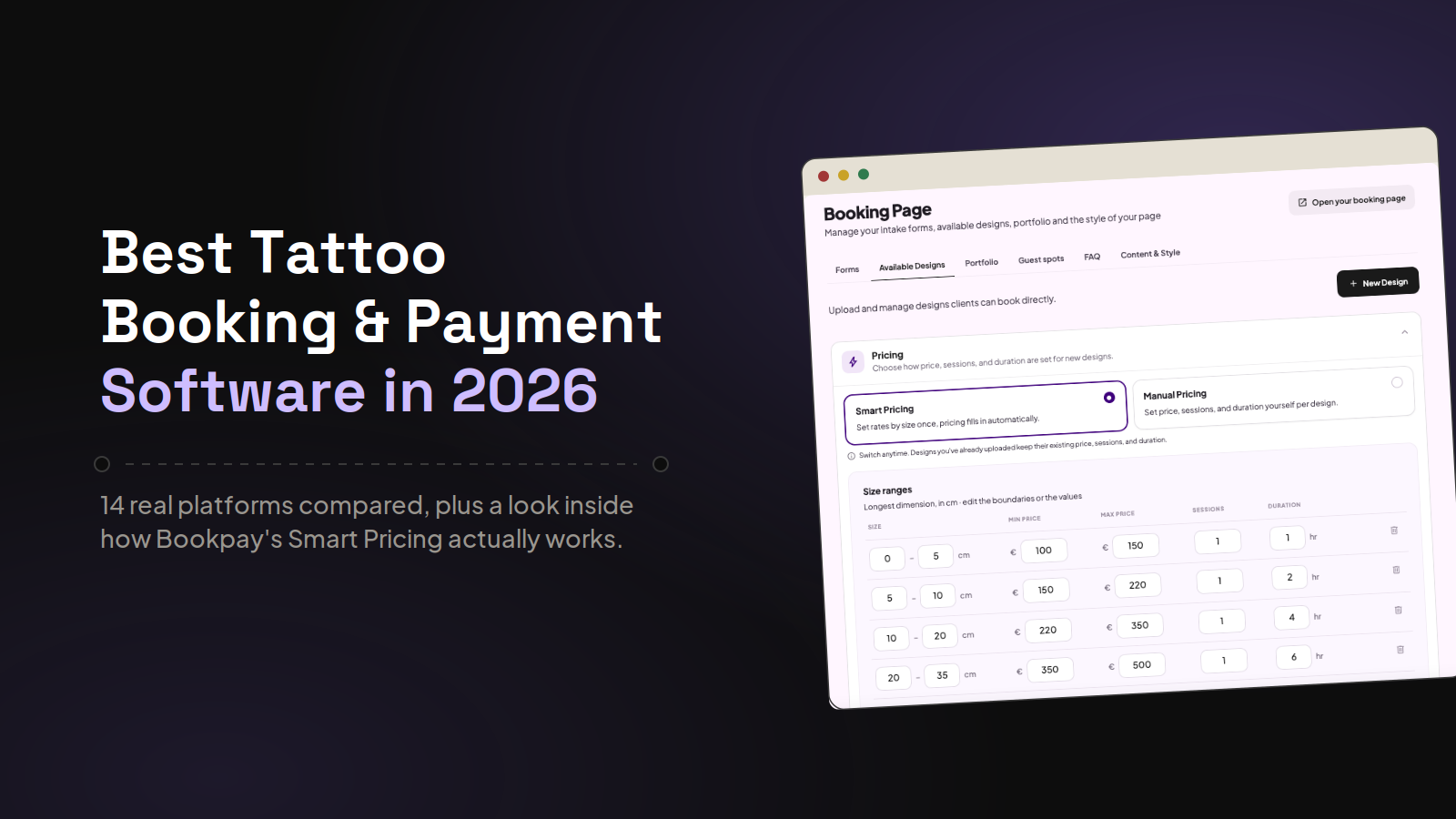
Noteworthy features. Smart Pricing lets you build a size-based pricing table once (longest dimension of a design maps to a price range and session length), so uploading new flash doesn't mean re-typing pricing every time. IG Connect pulls your existing Instagram portfolio straight into Bookpay, so you're not manually re-uploading work you've already posted. Payment Links turn a mid-DM conversation into a real booking, you generate a link, the client pays, and a booking is created without them filling out a form from scratch. A built-in CRM keeps a full history on every client, exportable to CSV anytime, and a real-time balance tracker plus in-person POS let you collect the remaining balance after the session, with Klarna or Affirm installments available if the client wants to split it. Artists working within a studio can also let the studio collect payments on their behalf instead of handling it themselves. With Guest spots clients can book before the artist even lands, and digital consent forms lets their clients sign on their phone before they walk in.
Pros and cons. The flat €10 fee is predictable in a way a percentage isn't, especially useful on larger pieces where a percentage-based fee would cost a client a lot more. Because it's part of the wider Inkjin ecosystem, you also get discovery traffic from Inkjin's consumer app, not just a booking tool in isolation. The trade-off is that Bookpay is newer than some of the tattoo-specific platforms below, so studio-level features like a dedicated multi-artist dashboard are still on the way rather than fully built out.
Venue Ink
Venue Ink is an all-in-one booking and payments app for tattoo artists, covering inquiry forms, scheduling, deposits, client messaging, and flash management from a single mobile app.
Cost. Free for artists, no subscription. Venue charges a 10% fee on deposits and payments, and you can choose whether the client pays it, you absorb it, or you split it.
Noteworthy features. Flash management lets you upload designs, set pricing, and mark pieces as repeatable or one-off, with availability updating in real time. An Events feature is built for flash days and conventions, letting multiple artists share one booking page. Payments support cards, Apple Pay, Google Pay, and buy-now-pay-later through Affirm.
Pros and cons. Venue is one of the more established tattoo-specific tools, with a polished app and a workflow that clearly comes from people who understand the industry. The 10% fee is the thing to watch: on a $500 deposit, that's $50 tacked on at checkout, which is a bigger number for a client to swallow than a flat fee, though the configurable payer setting softens that if you'd rather absorb it yourself.
Tattoo Studio Pro
Tattoo Studio Pro is a management platform for tattoo and piercing studios, bundling scheduling, digital consent forms, client CRM, and payment processing into one product.
Cost. Priced by team size rather than feature tier, so every plan gets the full feature set. Solo starts around $29/month, with team plans scaling up from there as you add artists.
Noteworthy features. A walk-in queue workflow and digital consent forms come standard at every plan, along with detailed client history. It runs on iOS, Android, and web.
Pros and cons. No feature-gating is a genuinely good deal if you want everything from day one. The interface leans dense, which can feel like overkill if all you actually need is a calendar and a deposit link.
InkDesk
InkDesk organizes the full client pipeline, intake, scheduling, notes, and payments, under a single per-client ticket rather than scattering that information across tools.
Cost. A flat monthly subscription rather than a per-booking fee, with a free trial available.
Noteworthy features. The project-ticket approach groups everything related to one booking (images, notes, consent forms, payment status) in a single view, which is handy for multi-session pieces where details pile up over months.
Pros and cons. The flat subscription means your costs don't scale with how much you book, which is appealing if you run a high volume of large-deposit sessions. It also means you're paying the same amount in a slow month as a busy one, and the feature set stays fairly narrow: booking and client management, without built-in marketing or commission tracking for studios.
Co:Create Ink
Co:Create Ink is a newer tattoo-specific platform covering booking requests, client messaging, deposits, and payments in one app. It also runs artist verification (peer review, studio location, portfolio checks) to build client trust before a booking happens.
Cost. Free for artists, no commission. Like Bookpay, it's funded by a flat $10 fee the client pays when they confirm a booking, rather than a percentage of the deposit.
Noteworthy features. Artists can post "Wanna Do" flash designs clients book instantly, or take custom booking requests where the client shares an idea and budget and the artist sends a quote. Session payments can be split into installments through Klarna, Afterpay, or Affirm while the artist still gets the full amount upfront. An in-app invite system lets artists bring other artists onto the platform directly.
Pros and cons. The flat fee model is a real advantage over the percentage-based platforms, and the verification step is a nice trust signal for clients booking with someone new. It's also the youngest platform on this list, still at version 1.0 on mobile, so expect a narrower feature set and rougher edges than the more established tattoo-specific tools, with fewer of the scheduling extras (guest spots, waitlists, studio dashboards) that some competitors already have.
Get Ink
Get Ink is a UK-based booking and admin app for tattoo artists and studios, covering enquiries, a custom profile page, calendar, deposits, and client messaging.
Cost. An Essentials plan is free. Paid Pro plans are billed monthly with no contract, and can be cancelled anytime.
Noteworthy features. The profile page doubles as a lightweight artist website, with FAQs, policies, a work gallery, and a list of studios or guest spots you work at. Clients can pay in installments through Klarna or Clearpay/Afterpay, and there's no cap on how many SMS or email reminders you send.
Pros and cons. The free Essentials tier makes it an easy first step for artists who aren't ready to pay for anything yet, and the no-contract Pro plans keep the commitment low after that. It's a smaller, UK-centric platform, so name recognition and third-party integrations are thinner than the bigger US players on this list.
InkPoke
InkPoke is a newer booking platform built around client history: a CRM that tracks what each client got last time, alongside a portfolio showcase and calendar.
Cost. InkPoke advertises no contracts and no hidden fees, though detailed pricing isn't published on the site, so you'll want to check directly before assuming a number.
Noteworthy features. The client CRM is the standout: past work, preferences, and booking history are attached to each client profile, which is useful for repeat clients working on a sleeve or larger piece over several sessions. Setup is quick, a profile with portfolio, services, prices, and hours takes about five minutes, and the booking link format (inkpoke.com/@yourname) is built to drop straight into an Instagram bio.
Pros and cons. The client-history angle is a genuinely useful detail that a lot of competitors treat as an afterthought. As a newer platform, it has a thinner feature set around things like flash catalogs, multi-artist studio tools, and marketing, and the lack of published pricing makes it harder to compare against everything else on this list up front.
Discovery & Marketplace Platforms
Tattoodo
Tattoodo has moved beyond pure discovery into its own booking product, Tattoodo Books, which turns Instagram DM conversations into an actual booking form and payment flow without the client leaving the thread.
Cost. Free to join, no monthly subscription. A flat $10 fee applies per booking, paid by the client by default, though you can split it or cover it yourself.
Noteworthy features. Booking requests can be triggered right inside an Instagram DM, the client taps a form link, fills in size, placement, references, and budget, and pays a deposit without downloading anything. Payments support cards, Apple Pay, and installments through Klarna and Affirm, with tipping built into checkout. No-show protection means you keep the deposit if a client doesn't show, and Tattoodo handles payment disputes on your behalf. Artists who run their books through Tattoodo also get surfaced in Tattoodo's own search and community, on top of whatever bookings they bring in themselves, and can post flash with fixed pricing that clients book directly.
Pros and cons. The DM-first flow is a genuinely different approach, meeting clients where the conversation already is instead of routing them to a separate app or link. The flat per-booking fee with no subscription keeps costs predictable. Tattoodo's real advantage is still the size of its community for discovery, so artists who want both a booking tool and public visibility get more out of it than someone using it purely for booking.
Salon and Beauty Platforms Used by Tattoo Studios
Vagaro
Vagaro is a general booking and business management platform for salons, spas, and beauty businesses that a fair number of tattoo studios have adopted anyway.
Cost. Starts around $30/month for one calendar, plus a per-staff fee for additional artists. Extras like custom forms and text marketing cost more on top, so a multi-artist studio can land closer to $80-100/month once you add what you actually need.
Pros and cons. Vagaro's strength is breadth: scheduling, payments, marketing, and a discovery marketplace all in one place. The weakness is that none of it was designed with tattoo workflows in mind, so things like reference image intake and multi-session projects feel bolted on rather than native.
Treatwell
Treatwell is a large European salon and beauty marketplace, big in the UK and across the continent, that some tattoo studios list on for the discovery traffic even though it wasn't built with tattoo bookings in mind.
Cost. A monthly software fee for the calendar and management tools, plus a 35% commission on a new client's first booking through the marketplace. Repeat bookings from that same client, and anything booked directly (calls, texts, your own site, or your Instagram/Facebook booking button), are commission-free. A small processing fee applies if a client pays online in advance.
Pros and cons. The marketplace reach is real, Treatwell partners with well over 100,000 salons across Europe, and the repeat-booking-is-free structure rewards studios that build a loyal client base rather than churning through one-off visitors. The 35% first-booking commission is steep next to the flat-fee tattoo-specific tools above, and reviews commonly flag confusing billing and slow payouts. It's also built around walk-in-style salon services, not deposit-heavy, multi-session tattoo projects, so the booking flow doesn't map cleanly onto how most artists actually work.
Square Appointments
Square Appointments is the scheduling layer on top of Square's broader payments and POS ecosystem, which a lot of artists already use for card processing.
Cost. A free starter tier exists, with paid plans running $35-85/month per location, plus standard Square transaction fees on top.
Pros and cons. If you're already running Square hardware for in-person payments, the integration is genuinely convenient. Some of the more useful scheduling features, like calendar sync and waitlists, are locked behind the paid tiers, and it wasn't built with tattoo-specific needs like flash catalogs or deposit-to-balance workflows in mind.
Fresha
Fresha is a large salon and spa booking platform that dropped its long-standing free-forever plan in 2025, so the pricing picture looks different than what a lot of older reviews still describe.
Cost. Plans now start around $19.95/month for a solo user or $14.95/month per team member on the Team plan, on top of that there's a one-time 20% commission (minimum around $6) on a new client's first booking through Fresha's marketplace, plus standard card processing fees.
Pros and cons. The marketplace listing and scheduling tools are polished, and the per-transaction processing rates are competitive if you're taking most payments in person. The economics have shifted against solo artists since the free plan disappeared, and between the seat-based subscription, the marketplace commission, and processing fees, the real monthly cost is harder to predict upfront than the flat-fee tattoo-specific tools above.
General Scheduling and Form Tools
Jotform
Jotform is a generic form builder, not a booking platform, that a lot of artists started with simply because it's easy and flexible.
Cost. A limited free tier, with paid plans starting around $34-39/month (annual billing) and scaling with form and submission limits.
Pros and cons. It's the lowest-friction way to get an intake form live if you've never used any tool before. But there's no calendar, no automated reminders, and no built-in deposit collection, so as soon as your needs grow past "collect some information," you're either stitching together other tools or moving to something purpose-built.
BookedIn
BookedIn is a general appointment scheduling app used across barbershops, salons, tattoo studios, and plenty of unrelated service businesses, rather than something built specifically for tattoo work.
Cost. A Free plan covers up to 20 bookings a month with the basics (branded booking page, social and website integrations, custom forms). Paid plans start at $24/month for Plus (adds reminders, online payment processing, and recurring bookings) and run up to around $39-48/month for Pro (adds file attachments, ad tracking, and the ability to remove BookedIn's branding).
Pros and cons. The free tier is a genuinely usable starting point for a low-volume artist, and pricing is straightforward compared to some of the fee-stacked platforms above. It's a general scheduling tool at heart though, so there's no flash management, no consent forms, and no tattoo-specific intake, you're getting a calendar and deposit collection, not a tattoo-shaped workflow.
Calendly
Calendly is a general meeting-scheduling tool, built for booking calls and consultations rather than tattoo sessions, that some artists press into service anyway because it's cheap and already familiar from other work.
Cost. Payment collection requires at least the Professional plan, around $12/month. On top of that, Calendly doesn't charge its own fee for payments, but Stripe's standard processing rate (2.9% + $0.30 per transaction) applies to whatever you collect.
Pros and cons. Connecting Stripe gets you real payment collection at booking, cards, Apple Pay, Google Pay, and even Klarna or Affirm depending on setup, along with automatic payout routing and receipts. But Calendly has no concept of a tattoo-specific workflow at all: no intake form for placement or references, no flash catalog, no deposit-versus-balance split, and no built-in refund handling if a client cancels, you'd be doing that manually in Stripe. It's a meeting scheduler with payments bolted on, not a booking tool built for how tattoo sessions actually work.
Is It Worth Switching?
Every hour spent answering the same three questions in DMs, or double-booking because your calendar lives in your head, is an hour you're not tattooing. That's really the trade you're weighing: a bit of setup time now against a lot less admin every week after.
Bookpay is free to set up, takes less than ten minutes, and there's no subscription or commission eating into your revenue. If you're ready to stop running your business out of your DMs, Bookpay is the next level in tattoo booking.
👉 Try Bookpay for free
💬 DM us @inkjinapp and let us know what you think